Google翻訳 리뷰
AI 번역The world's largest translation service by Google. Supports 133 languages with free AI 기반 translation for text, voice, images, and documents.
에디터 평가
Google翻訳은(는) AI 번역 분야에서 상위권에 속하는 도구 중 하나로 5점 만점에 4.2점을 받았습니다. 가장 두드러진 강점은 World's largest translation service supporting 133+ languages이며, 해당 기능이 워크플로에서 중요한 경우 특히 가치가 큽니다. 주된 단점은 Translation 정확도 for technical terminology may be inferior to DeepL이므로, 다른 대안과 비교해 본 뒤 도입 여부를 결정하는 것이 좋습니다. 무료 플랜으로 적합성을 위험 없이 검증할 수 있기 때문에, 먼저 시험해 보는 데에 거의 부담이 없습니다.
목차
Google翻訳이란?
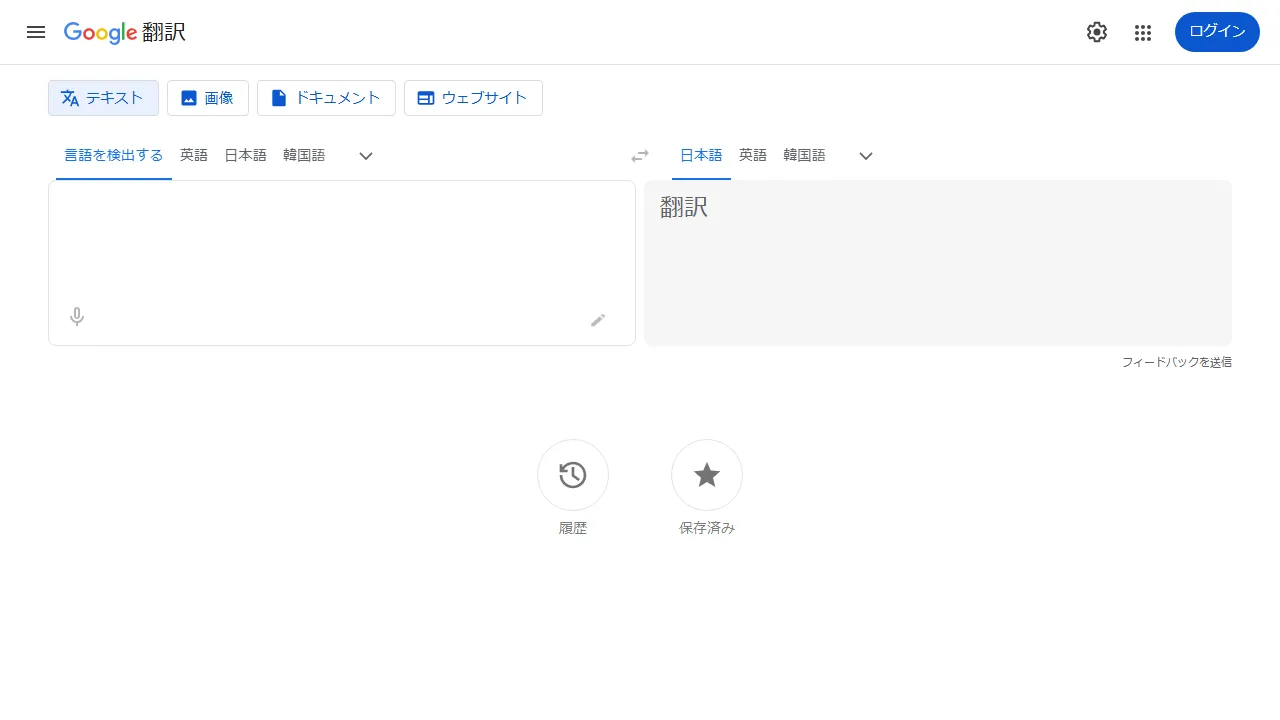
Google Translate is the world's largest AI translation service provided by Google, supporting translation between over 133 languages. Using Neural Machine Translation (NMT) technology, it delivers natural translations that understand context. Beyond text translation, it supports camera-based image translation (signs, menus, etc.), 실시간 voice translation, handwriting input translation, and document translation (PDF, Word, Excel, and more). The offline translation feature allows use even without an internet connection. Integration with Google Chrome enables one-click translation of entire web pages. It's completely free to use, and Google Cloud Translation API 사용 가능합니다 for business needs.
Google翻訳은(는) 누구를 위한 도구인가?
Google翻訳은(는) 다국어 문서를 다루는 글로벌 기업, 콘텐츠 현지화 담당자, 다언어 팀에게 가장 적합합니다. 무료 플랜이 제공되므로 진입 장벽이 낮아 실제 도입 전에 부담 없이 평가해 볼 수 있습니다. 6개 이상의 폭넓은 기능을 갖추고 있어, Text translation in 133 languages, Camera image translation 등을 포함해 관련 작업을 위해 다른 도구로 전환할 필요가 거의 없습니다. 사용자가 공통적으로 꼽는 강점은 다음 한 가지입니다: World's largest translation service supporting 133+ languages.
요금제 & 가성비
Google翻訳은(는) 아래의 요금제를 제공합니다. 표기된 가격은 리뷰 시점의 최신 정보이며 변경될 수 있으므로, 구매 전에 반드시 공식 사이트에서 확인해 주세요.
주요 기능
Google翻訳이 제공하는 주요 기능을, 제품 경험에서 차지하는 비중이 큰 순서대로 정리했습니다.
장점과 단점
Google翻訳을(를) 동일한 AI 번역 카테고리의 다른 도구들과 비교해 평가한 결과, 실제 사용에서 눈에 띈 장단점은 다음과 같습니다.
좋았던 점
- ●World's largest translation service supporting 133+ languages
- ●Completely free to use
- ●Supports camera translation, voice translation, and document translation
- ●Offline translation works without internet connectivity
- ●Chrome 연동 for instant full web page translation
개선되면 좋을 점
- ●Translation 정확도 for technical terminology may be inferior to DeepL
- ●Context understanding can be insufficient for longer texts
- ●No ability to adjust translation nuance or writing style
Google翻訳 시작하는 방법
Google翻訳을(를) 처음 평가하는 분들을 위한 5단계 가이드입니다. 시간을 낭비하지 않고 빠르게 판단할 수 있도록 설계되었습니다.
1Google翻訳 가입하기
Google翻訳 공식 웹사이트에 접속해 계정을 만듭니다. 결제 정보를 입력하지 않고도 무료 플랜으로 바로 시작할 수 있으므로, 워크플로에 맞는지 테스트하기에 이상적입니다.
2작업 환경 설정하기
Web 전용 클라이언트가 제공된다면 설치하거나, 브라우저에서 바로 열어 사용할 수 있습니다. 언어, 알림, 기본 출력 스타일 등 기본 환경설정을 맞춰두면 이후 사용 시 일관된 결과를 얻을 수 있습니다.
3Text translation in 133 languages(으)로 첫 작업 실행하기
Google翻訳의 반응을 파악할 수 있도록 부담 없는 작은 작업부터 시작해 보세요. 명확한 프롬프트나 입력을 작성하고 결과를 검토한 뒤 반복 개선합니다. 이 저위험 탐색 과정이 도구의 강점을 빠르게 익히는 가장 좋은 방법입니다.
4일상 워크플로에 통합하기
도구의 강점을 파악했다면 열 개가 아니라 하나의 구체적인 워크플로부터 Google翻訳을(를) 도입해 보세요. 기존 단계 중 하나를 이 도구로 대체하고, 일주일 정도 절약된 시간이나 개선된 품질을 측정한 뒤에 사용 범위를 확대하세요.
5실제 사용량을 기준으로 업그레이드하기
처음부터 상위 플랜에 가입하기보다는 실제로 한도에 부딪히는 지점(메시지 수, 출력 길이, 내보내기 기능 등)을 관찰하세요. 상위 플랜이 더 매력적으로 보여서가 아니라, 특정 한도가 생산성을 가로막을 때 업그레이드하는 것이 합리적입니다.
추천 Google翻訳 대안
Google翻訳이 맞지 않을 수도 있습니다. 같은 AI 번역 카테고리의 비슷한 도구들 중, 우선순위에 따라 고려해 볼 만한 옵션을 정리했습니다.
Papago
An AI translation app developed by NAVER. Supports text, voice, and image translation with 업계 최고의 정확도 for Korean-일본어 and Korean-English pairs.
유사한 에디터 평점를 제공합니다. Extremely high translation 정확도 for Korean-일본어 and Korean-English pairs을(를) 원한다면 좋은 선택입니다.
Weglot
AI 기반 website translation tool. Translate and publish in 60+ languages automatically.
유사한 에디터 평점에 더 저렴한 진입 가격를 제공합니다. Multilingual site with one line of code을(를) 원한다면 좋은 선택입니다.
PLaMo翻訳
A 일본어-specialized AI translation service developed by Preferred Networks. Combines 고품질 translation with security through local execution, powered by a domestically-built LLM.
유사한 에디터 평점에 더 저렴한 진입 가격를 제공합니다. Exceptionally high 일본어 번역 quality powered by a domestic LLM을(를) 원한다면 좋은 선택입니다.
자주 묻는 질문
Is Google Translate free?+
네, it is completely free for personal use. Business use via API requires Google Cloud Translation API pricing.
Which is more accurate, Google Translate or DeepL?+
Generally, DeepL is considered superior for European language pairs and 일본어-English translation quality. 그러나 Google Translate's strengths lie in its support for 133 languages and versatile features like camera translation.
Can it be used offline?+
네, by downloading translation packages on the smartphone app in advance, text translation 사용 가능합니다 even in offline environments.
Google翻訳을(를) 사용해 볼 준비가 되셨나요?
무료 플랜부터 시작해 보세요. 신용카드 등록이 필요 없습니다.
Google翻訳 시작하기 →다른 AI 번역 도구
DeepL
A high-정확도 AI 번역 도구 from Germany. Its 일본어-English translation quality is widely regarded as superior to Google Translate.
みらい翻訳
An enterprise AI translation service developed by the NTT Group. Achieves TOEIC 960-level 정확도 with robust security, ideal for business document translation.
Papago
An AI translation app developed by NAVER. Supports text, voice, and image translation with 업계 최고의 정확도 for Korean-일본어 and Korean-English pairs.
Reverso
An AI 도구 integrating translation and language learning. Provides contextual translation examples and synonym suggestions, with particular strength in European languages.
SYSTRAN Translate
A veteran AI 번역 도구 with over 50 years of history. Offers high-정확도 neural translation in 55 languages with industry-specific customization.
Amazon Translate
A neural machine translation service from AWS. Supports 75+ languages with pay-per-use pricing, ideal for large-scale translation via API 연동.
검토자: AIpedia 편집부 · 최근 업데이트: 2026년 7월 10일 · 평가 방법: 리뷰와 평점 기준
본 리뷰는 직접 테스트, 요금 검증, 공식 문서와의 교차 확인을 기반으로 작성된 편집부의 의견을 담고 있습니다. 좋은 평가를 조건으로 금전적 대가를 받지 않습니다. 자세한 내용은 편집 정책을 참고하세요.